让您的开票实现自动化的 API

最快 2 周即可完成在线商店、交易平台或系统的集成,毫不复杂。只需一个 API 方法,即可在业务流程的任意环节开具发票!

对勾 可用性 99.99%
对勾 每月开具数十万张发票
对勾 技术支持与文档
信息、报价、演示。

众多大型企业都在使用的开票 API

对性能与可靠性有严苛要求的企业都信赖我们的 API。

使用我们的 API,您可以自动化所有涉及开具发票、运输单据或其他税务单据的流程,从而提升业务效率与可扩展性。

只需一次集成,即可每天开具数万张发票。

我们提供有竞争力的方案,满足各类规模企业的需求。

Uber 标志Bird 标志Acciona 标志Sgs 标志Cooltra 标志Zaask 标志LandingJobs 标志Guestready 标志ShowRoomPrive 标志
https://bo.magnifinance.com/api/v1/document
{
  "IsToClose" : "true",
  "SendTo" : "email@email.com",
  "Client" : {
    "NIF":"180975030",
    "Name":"Company lda",
    "Address":"Av. Sidónio Pais, Nº 2, 2 Esq. A",
    "City":"Lisboa",
    "PostCode":"1050-215",
    "CountryCode":"pt",
    "PhoneNumber":"999999999",
    "CountryName":"Portugal",
    "LegalName":"Company lda",
    "Email":"email@email.com",
    "IBAN":"321654987321654987"
  },
  "Document" : {
    "Type": "T",
    "Date": "????",
    "DueDate": ""????",
    "Description": "Um documento de exemplo da api",
    "Serie": "FR",
    "Currency": "eur",
    "EuroRate": "1",
    "Retention": "1",
    "Lines" : [
      {
        "Code": "SI",
        "Description": "Produto 2",
        "UnitPrice": "1",
        "Quantity": "1",
        "Unit": "unit",
        "Type": "S",
        "TaxValue": "23",
        "ProductDiscount": "20",
        "CostCenter" : "Centro de custo x"
      }
    ]
  }
}

成交后自动开具发票,并通过个性化邮件轻松发送给客户

集成我们的 API 后,销售一旦完成即可自动开具发票。

在同一个请求中,您还可以使用通过邮件发送发票的选项,由我们的服务以个性化版式即时发出,为您省去大量开发与维护工作。

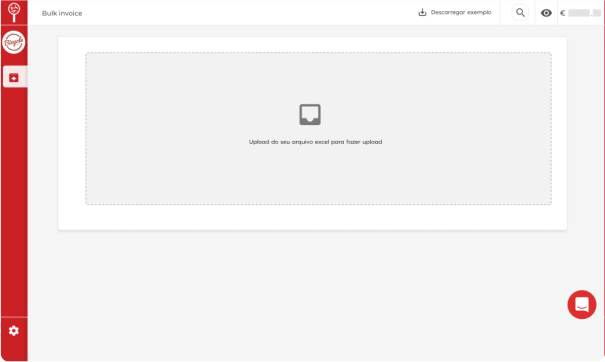
借助 Bulk Invoicing,无需等待 API 集成完成即可开始大规模开票

Bulk Invoicing 服务让您无需立即完成 API 集成,即可开具大批量单据。您只需向我们发送一份数据传输文件(CSV、XML 或 JSON),其中包含需要体现在发票上的字段,我们即可生成单据。

在我们的 API 集成实施期间,这是一个可立即启用的理想方案,让您先行开票。
https://bo.magnifinance.com/api/v1/document
Bulk invoicing

订阅开票 API,开启贵公司的开票自动化

只需几个步骤即可启动 API 集成:

  • 申请报价与 30 天试用。
  • 获取沙盒账户,用于测试 API 并开具不具法律效力的单据。
  • 在集成过程中获得专业技术支持与最新文档。
  • 获取生产环境令牌,开始自动开票。

现代化开票 API,集成简单,文档保持更新,并提供实施技术支持

订阅 API 后,除全部 API 文档和用于测试的沙盒账户外,贵公司还可在 10:00 至 19:00(GMT+1)联系我们的专业技术支持团队,解答实施过程中的任何疑问。

技术支持
DOCUMENTCREATE
DOCUMENTGET
WAYBILLCREATE
https://bo.magnifinance.com/api/v1/document
<inv:DocumentCreate>
  <inv:Authentication>
    <inv:Email>
???? </inv:Email>
    <inv:Token>
???? </inv:Token>
  </inv:Authentication>
  <inv:Client>
    <inv:NIF>
???? </inv:NIF>
    <inv:LegalName>
???? </inv:LegalName>
    <inv:CountryCode>
???? </inv:CountryCode>
  </inv:Client>
  <inv:Document>
    <inv:Date>
???? </inv:Date>
    <inv:DueDate>
???? </inv:DueDate>
    <inv:Description>
???? </inv:Description>
    <inv:Type>
???? </inv:Type>
    <inv:Serie>
???? </inv:Serie>
    <inv:TaxExemptionReasonCode>
???? </inv:TaxExemptionReasonCode>
    <inv:DocumentReference>
???? </inv:DocumentReference>
    <inv:Currency>
???? </inv:Currency>
    <inv:Retention>
???? </inv:Retention>
    <inv:EuroRate>
???? </inv:EuroRate>
    <inv:Lines>
      <inv:APIInvoicingProduct>
      <inv:Code>
???? </inv:Code>
      <inv:Description>
???? </inv:Description>
      <inv:UnitPrice>
???? </inv:UnitPrice>
      <inv:Quantity>
???? </inv:Quantity>
      <inv:Unit>
???? </inv:Unit>
      <inv:Type>
???? </inv:Type>
      <inv:TaxValue>
???? </inv:TaxValue>
      <inv:ProductDiscount>
???? </inv:ProductDiscount>
      <inv:CostCenter>
???? </inv:CostCenter>
    </inv:APIInvoicingProduct>
    </inv:Lines>
  </inv:Document>
  <inv:IsToClose>
???? </inv:IsToClose>
  <inv:SendTo>
???? </inv:SendTo>
</inv:DocumentCreate>
https://bo.magnifinance.com/api/v1/document
<inv:DocumentGet>
  <inv:Authentication>
  <inv:Email>
???? </inv:Email>
  <inv:Token>
???? </inv:Token>
  </inv:Authentication>
  <inv:DocumentId>
???? </inv:DocumentId>
</inv:DocumentGet>
https://bo.magnifinance.com/api/v1/document
<inv:WaybillCreate>
  <inv:Authentication>
    <inv:Email>
???? </inv:Email>
    <inv:Token>
???? </inv:Token>
  </inv:Authentication>
  <inv:Client>
    <inv:NIF>
???? </inv:NIF>
    <inv:Name>
???? </inv:Name>
    <inv:Address>
???? </inv:Address>
    <inv:CountryCode>
???? </inv:CountryCode>
  </inv:Client>
  <inv:Waybill>
    <inv:Date>
???? </inv:Date>
    <inv:DueDate>
???? </inv:DueDate>
    <inv:Description>
???? </inv:Description>
    <inv:Type>
???? </inv:Type>
    <inv:Serie>
???? </inv:Serie>
    <inv:TaxExemptionReasonCode>
???? </inv:TaxExemptionReasonCode>
    <inv:Currency>
???? </inv:Currency>
    <inv:Retention>
???? </inv:Retention>
    <inv:Lines>
    <inv:APIInvoicingProduct>
      <inv:Code>
???? </inv:Code>
      <inv:Description>
???? </inv:Description>
      <inv:UnitPrice>
???? </inv:UnitPrice>
      <inv:Quantity>
???? </inv:Quantity>
      <inv:Unit>
???? </inv:Unit>
      <inv:Type>
???? </inv:Type>
      <inv:TaxValue>
???? </inv:TaxValue>
      <inv:ProductDiscount>
???? </inv:ProductDiscount>
      <inv:CostCenter>
???? </inv:CostCenter>
    </inv:APIInvoicingProduct>
    </inv:Lines>
    <inv:LoadDateTime>
???? </inv:LoadDateTime>
    <inv:LoadAddress>
    <inv:AddressDetail>
???? </inv:AddressDetail>
    <inv:City>
???? </inv:City>
    <inv:PostalCode>
???? </inv:PostalCode>
    <inv:CountryCode>
???? </inv:CountryCode>
    </inv:LoadAddress>
    <inv:DestinationAddress>
    <inv:AddressDetail>
???? </inv:AddressDetail>
    <inv:City>
???? </inv:City>
    <inv:PostalCode>
???? </inv:PostalCode>
    <inv:CountryCode>
???? </inv:CountryCode>
    </inv:DestinationAddress>
    <inv:VehicleLicence>
???? </inv:VehicleLicence>
  </inv:Waybill>
  <inv:IsToClose>
???? </inv:IsToClose>
</inv:WaybillCreate>

通过 API 自动开票非常简单

一套易于实施的 API(REST 与 SOAP)。贵公司只需两个方法即可开始自动开票:

  • DocumentCreate (POST)
    接收单据参数,例如客户名称、产品与单据类型,并返回所生成单据的 ID。

  • DocumentGet (GET)
    接收一个 ID,并返回所生成 PDF 的下载地址。

  • WaybillCreate (POST)
    仅在需要创建运输单据时使用。

代合作伙伴开具发票

IPPN (Invoicing Platform for Partners Network) 是一项面向需要代合作伙伴开具发票的企业的服务。可用方法如下:

  • AddPartner
    向合作伙伴发送请求,邀请其创建账户或授权代合作企业开票。

  • GetPartnerAccessTokens
    合作伙伴接受开票请求后,可用于获取代其开票所需的令牌。
ADDPARTNER
GETPARTNERACCESSTOKENS
https://bo.magnifinance.com/api/v1/document
<inv:AddPartner>
  <inv:Authentication>
    <inv:Email>
???? </inv:Email>
    <inv:Token>
???? </inv:Token>
  </inv:Authentication>
  <inv:PartnerInformation>
    <inv:UserName>
???? </inv:UserName>
    <inv:UserEmail>
???? </inv:UserEmail>
    <inv:UserPhone>
???? </inv:UserPhone>
    <inv:CompanyTaxId>
???? </inv:CompanyTaxId>
    <inv:CompanyLegalName>
???? </inv:CompanyLegalName>
    <inv:CompanyAddress>
???? </inv:CompanyAddress>
    <inv:CompanyCity>
???? ?</inv:CompanyCity>
    <inv:CompanyPostCode>
???? </inv:CompanyPostCode>
    <inv:CompanyCountry>
???? </inv:CompanyCountry>
  </inv:PartnerInformation>
</inv:AddPartner>
https://bo.magnifinance.com/api/v1/document
<inv:GetPartnerAccessTokens>
  <inv:SpecialAuthentication>
    <inv:Email>
???? </inv:Email>
    <inv:Token>
???? </inv:Token>
    <inv:Password>
???? </inv:Password>
  </inv:SpecialAuthentication>
  <inv:PartnerTaxId>
???? </inv:PartnerTaxId>
</inv:GetPartnerAccessTokens>
ACTIVATIONSET
ACTIVATIONGET
COMMUNICATIONLIST
https://bo.magnifinance.com/api/v1/document
<tax:ActivationSet>
  <tax:authentication>
    <tax:Email>
???? </tax:Email>
    <tax:Token>
???? </tax:Token>
  </tax:authentication>
  <tax:activation>
    <tax:Username>
???? </tax:Username>
    <tax:Password>
???? </tax:Password>
    <tax:IsActive>
???? </tax:IsActive>
  </tax:activation>
</tax:ActivationSet>
https://bo.magnifinance.com/api/v1/document
<tax:ActivationGet>
  <tax:authentication>
    <tax:Email>
???? </tax:Email>
    <tax:Token>
???? /tax:Token>
  </tax:authentication>
</tax:ActivationGet>
https://bo.magnifinance.com/api/v1/document
<tax:CommunicationList>
  <tax:authentication>
    <tax:Email>
???? </tax:Email>
    <tax:Token>
???? </tax:Token>
  </tax:authentication>
  <tax:parameters>
    <tax:TotalElements>
???? </tax:TotalElements>
    <tax:ElementsPerPage>
???? </tax:ElementsPerPage>
    <tax:CurrentPage>
???? </tax:CurrentPage>
  </tax:parameters>
</tax:CommunicationList>

向葡萄牙税务局(AT)自动申报发票的 API

您可以直接在 API 中配置向葡萄牙税务局(AT)自动申报,并查看成功申报的单据列表。可用方法如下:

  • ActivationSet 将公司密码设置为其葡萄牙税务局门户密码。

  • ActivationGet 确认与葡萄牙税务局门户的身份验证是否成功。

  • CommunicationList 返回已申报单据的列表,并显示每份单据在 AT 的申报状态。

单据付款状态查询 API

如果您需要了解某份单据的金额被标记为已付还是未付,可以通过 API 查询该状态,从而自动化依赖发票付款情况的流程。可用方法如下:

  • DocumentGetProperty (GET)
    返回单据为已付还是未付,以及尚未支付的金额。
https://bo.magnifinance.com/api/v1/document
<inv:DocumentGetProperty>
  <inv:Authentication>
    <inv:Email>
???? </inv:Email>
    <inv:Token>
???? </inv:Token>
  </inv:Authentication>
  <inv:DocumentId>
???? </inv:DocumentId>
  <inv:DocumentProperty>paymentstatus</inv:DocumentProperty>
</inv:DocumentGetProperty>
WooCommerce 开票插件

MagniFinance WooCommerce 开票插件

在您的 WooCommerce 商店开具认证发票

作者: MagniFinance

星标星标星标星标星标 (1)
1 次有效安装
最后更新:2021
check 与您的 WordPress 版本兼容

WooCommerce 开票插件 fiber_new

使用 WooCommerce 开票插件,让 WooCommerce 在线商店的开票自动化变得更加简单:无需开发团队,每笔销售发生时即可自动开票。

开始使用只需联系我们的客服团队,申请用于该插件的 API 账户。您将收到沙盒账户、令牌以及使用插件所需的全部说明。随后安装插件,即可开始开票。

让贵公司的开票实现自动化

+ €12.90/月 + 增值税

在您的财务管理订阅费之外另行收取。