The API to automate your invoicing

Integrate your online store, marketplace or platform in up to 2 weeks, without any complications. With just one API method, you can issue invoices at any point in your business process!

check Uptime 99.99%
check Hundreds of thousands of invoices issued each month
check Technical support and documentation
Information, quotes, demos.

An invoicing API used by large companies

Our API is trusted by companies with high performance and reliability requirements.

By using our API, you can automate every process that involves issuing invoices, waybills or other tax documents, and increase the efficiency and scalability of your business.

With just one integration, you can issue tens of thousands of invoices every day.

We have competitive plans to meet the needs of businesses of all sizes.

Uber logoBird logoAcciona logoSgs logoCooltra logoZaask logoLandingJobs logoGuestready logoShowRoomPrive logo
https://bo.magnifinance.com/api/v1/document
{
  "IsToClose" : "true",
  "SendTo" : "email@email.com",
  "Client" : {
    "NIF":"180975030",
    "Name":"Company lda",
    "Address":"Av. Sidónio Pais, Nº 2, 2 Esq. A",
    "City":"Lisboa",
    "PostCode":"1050-215",
    "CountryCode":"pt",
    "PhoneNumber":"999999999",
    "CountryName":"Portugal",
    "LegalName":"Company lda",
    "Email":"email@email.com",
    "IBAN":"321654987321654987"
  },
  "Document" : {
    "Type": "T",
    "Date": "????",
    "DueDate": ""????",
    "Description": "Um documento de exemplo da api",
    "Serie": "FR",
    "Currency": "eur",
    "EuroRate": "1",
    "Retention": "1",
    "Lines" : [
      {
        "Code": "SI",
        "Description": "Produto 2",
        "UnitPrice": "1",
        "Quantity": "1",
        "Unit": "unit",
        "Type": "S",
        "TaxValue": "23",
        "ProductDiscount": "20",
        "CostCenter" : "Centro de custo x"
      }
    ]
  }
}

Issue the invoice automatically as soon as you make a sale and send it to the customer effortlessly in a personalised email

By integrating our API, you can issue invoices automatically as soon as a sale is completed.

In the same request, you can use the option to send the invoice by email with a personalised layout through our service. Sending is instant and will save you a great deal of development and maintenance work.

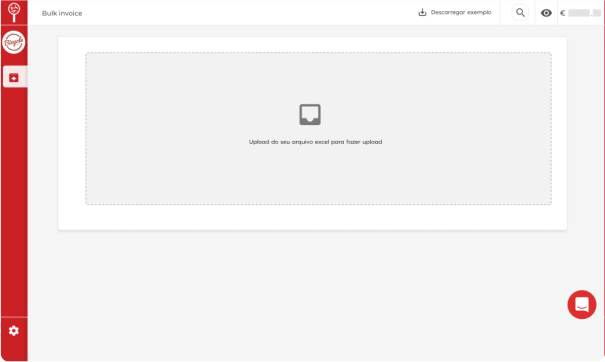
With our Bulk Invoicing, you can start invoicing at scale without waiting for the API implementation

The Bulk Invoicing service lets you issue large quantities of documents without the immediate need to implement the API. All you need to do is send us a data transfer file (CSV, XML or JSON) with the fields to include in the invoices, so that we can generate the documents.

It's a great immediate solution to start invoicing while the integration with our API is being implemented.
https://bo.magnifinance.com/api/v1/document
Bulk invoicing

Subscribe to the invoicing API to start automating your business's invoicing

Start the API implementation in just a few steps:

  • Ask for a quote and a 30-day trial.
  • Receive your sandbox account to test the API and issue documents that have no legal validity.
  • Get specialised technical support and up-to-date documentation during the implementation.
  • Receive your production tokens and start invoicing automatically.

Modern invoicing API with easy integration, up-to-date documentation and technical support for implementation

When you subscribe to the API, in addition to all the API documentation and a sandbox account for testing, your company has access to our specialised technical support team from 10:00 to 19:00 (GMT+1) to help with any questions about the implementation.

Technical support
DOCUMENTCREATE
DOCUMENTGET
WAYBILLCREATE
https://bo.magnifinance.com/api/v1/document
<inv:DocumentCreate>
  <inv:Authentication>
    <inv:Email>
???? </inv:Email>
    <inv:Token>
???? </inv:Token>
  </inv:Authentication>
  <inv:Client>
    <inv:NIF>
???? </inv:NIF>
    <inv:LegalName>
???? </inv:LegalName>
    <inv:CountryCode>
???? </inv:CountryCode>
  </inv:Client>
  <inv:Document>
    <inv:Date>
???? </inv:Date>
    <inv:DueDate>
???? </inv:DueDate>
    <inv:Description>
???? </inv:Description>
    <inv:Type>
???? </inv:Type>
    <inv:Serie>
???? </inv:Serie>
    <inv:TaxExemptionReasonCode>
???? </inv:TaxExemptionReasonCode>
    <inv:DocumentReference>
???? </inv:DocumentReference>
    <inv:Currency>
???? </inv:Currency>
    <inv:Retention>
???? </inv:Retention>
    <inv:EuroRate>
???? </inv:EuroRate>
    <inv:Lines>
      <inv:APIInvoicingProduct>
      <inv:Code>
???? </inv:Code>
      <inv:Description>
???? </inv:Description>
      <inv:UnitPrice>
???? </inv:UnitPrice>
      <inv:Quantity>
???? </inv:Quantity>
      <inv:Unit>
???? </inv:Unit>
      <inv:Type>
???? </inv:Type>
      <inv:TaxValue>
???? </inv:TaxValue>
      <inv:ProductDiscount>
???? </inv:ProductDiscount>
      <inv:CostCenter>
???? </inv:CostCenter>
    </inv:APIInvoicingProduct>
    </inv:Lines>
  </inv:Document>
  <inv:IsToClose>
???? </inv:IsToClose>
  <inv:SendTo>
???? </inv:SendTo>
</inv:DocumentCreate>
https://bo.magnifinance.com/api/v1/document
<inv:DocumentGet>
  <inv:Authentication>
  <inv:Email>
???? </inv:Email>
  <inv:Token>
???? </inv:Token>
  </inv:Authentication>
  <inv:DocumentId>
???? </inv:DocumentId>
</inv:DocumentGet>
https://bo.magnifinance.com/api/v1/document
<inv:WaybillCreate>
  <inv:Authentication>
    <inv:Email>
???? </inv:Email>
    <inv:Token>
???? </inv:Token>
  </inv:Authentication>
  <inv:Client>
    <inv:NIF>
???? </inv:NIF>
    <inv:Name>
???? </inv:Name>
    <inv:Address>
???? </inv:Address>
    <inv:CountryCode>
???? </inv:CountryCode>
  </inv:Client>
  <inv:Waybill>
    <inv:Date>
???? </inv:Date>
    <inv:DueDate>
???? </inv:DueDate>
    <inv:Description>
???? </inv:Description>
    <inv:Type>
???? </inv:Type>
    <inv:Serie>
???? </inv:Serie>
    <inv:TaxExemptionReasonCode>
???? </inv:TaxExemptionReasonCode>
    <inv:Currency>
???? </inv:Currency>
    <inv:Retention>
???? </inv:Retention>
    <inv:Lines>
    <inv:APIInvoicingProduct>
      <inv:Code>
???? </inv:Code>
      <inv:Description>
???? </inv:Description>
      <inv:UnitPrice>
???? </inv:UnitPrice>
      <inv:Quantity>
???? </inv:Quantity>
      <inv:Unit>
???? </inv:Unit>
      <inv:Type>
???? </inv:Type>
      <inv:TaxValue>
???? </inv:TaxValue>
      <inv:ProductDiscount>
???? </inv:ProductDiscount>
      <inv:CostCenter>
???? </inv:CostCenter>
    </inv:APIInvoicingProduct>
    </inv:Lines>
    <inv:LoadDateTime>
???? </inv:LoadDateTime>
    <inv:LoadAddress>
    <inv:AddressDetail>
???? </inv:AddressDetail>
    <inv:City>
???? </inv:City>
    <inv:PostalCode>
???? </inv:PostalCode>
    <inv:CountryCode>
???? </inv:CountryCode>
    </inv:LoadAddress>
    <inv:DestinationAddress>
    <inv:AddressDetail>
???? </inv:AddressDetail>
    <inv:City>
???? </inv:City>
    <inv:PostalCode>
???? </inv:PostalCode>
    <inv:CountryCode>
???? </inv:CountryCode>
    </inv:DestinationAddress>
    <inv:VehicleLicence>
???? </inv:VehicleLicence>
  </inv:Waybill>
  <inv:IsToClose>
???? </inv:IsToClose>
</inv:WaybillCreate>

Invoicing automatically via the API is very simple

An easy-to-implement API (REST and SOAP). Only two methods are needed for your company to start invoicing automatically:

  • DocumentCreate (POST)
    Receives the document parameters, such as the customer name, the product and the document type, and returns the ID of the generated document.

  • DocumentGet (GET)
    Receives an ID and returns the download address of the generated PDF.

  • WaybillCreate (POST)
    Used only when you need to create waybills.

Issue invoices on behalf of partners

The IPPN (Invoicing Platform for Partners Network) is a service for companies that need to issue invoices on behalf of partners. Available methods:

  • AddPartner
    Sends a request to the partner to create an account or to allow invoicing on behalf of the partner company.

  • GetPartnerAccessTokens
    Once the partner accepts the invoicing request, lets you retrieve the token needed to invoice on their behalf.
ADDPARTNER
GETPARTNERACCESSTOKENS
https://bo.magnifinance.com/api/v1/document
<inv:AddPartner>
  <inv:Authentication>
    <inv:Email>
???? </inv:Email>
    <inv:Token>
???? </inv:Token>
  </inv:Authentication>
  <inv:PartnerInformation>
    <inv:UserName>
???? </inv:UserName>
    <inv:UserEmail>
???? </inv:UserEmail>
    <inv:UserPhone>
???? </inv:UserPhone>
    <inv:CompanyTaxId>
???? </inv:CompanyTaxId>
    <inv:CompanyLegalName>
???? </inv:CompanyLegalName>
    <inv:CompanyAddress>
???? </inv:CompanyAddress>
    <inv:CompanyCity>
???? ?</inv:CompanyCity>
    <inv:CompanyPostCode>
???? </inv:CompanyPostCode>
    <inv:CompanyCountry>
???? </inv:CompanyCountry>
  </inv:PartnerInformation>
</inv:AddPartner>
https://bo.magnifinance.com/api/v1/document
<inv:GetPartnerAccessTokens>
  <inv:SpecialAuthentication>
    <inv:Email>
???? </inv:Email>
    <inv:Token>
???? </inv:Token>
    <inv:Password>
???? </inv:Password>
  </inv:SpecialAuthentication>
  <inv:PartnerTaxId>
???? </inv:PartnerTaxId>
</inv:GetPartnerAccessTokens>
ACTIVATIONSET
ACTIVATIONGET
COMMUNICATIONLIST
https://bo.magnifinance.com/api/v1/document
<tax:ActivationSet>
  <tax:authentication>
    <tax:Email>
???? </tax:Email>
    <tax:Token>
???? </tax:Token>
  </tax:authentication>
  <tax:activation>
    <tax:Username>
???? </tax:Username>
    <tax:Password>
???? </tax:Password>
    <tax:IsActive>
???? </tax:IsActive>
  </tax:activation>
</tax:ActivationSet>
https://bo.magnifinance.com/api/v1/document
<tax:ActivationGet>
  <tax:authentication>
    <tax:Email>
???? </tax:Email>
    <tax:Token>
???? /tax:Token>
  </tax:authentication>
</tax:ActivationGet>
https://bo.magnifinance.com/api/v1/document
<tax:CommunicationList>
  <tax:authentication>
    <tax:Email>
???? </tax:Email>
    <tax:Token>
???? </tax:Token>
  </tax:authentication>
  <tax:parameters>
    <tax:TotalElements>
???? </tax:TotalElements>
    <tax:ElementsPerPage>
???? </tax:ElementsPerPage>
    <tax:CurrentPage>
???? </tax:CurrentPage>
  </tax:parameters>
</tax:CommunicationList>

API for automatic reporting of invoices to the AT

You can set up automatic reporting to the Portuguese Tax Authority (AT) directly from the API and view the list of documents successfully reported. Available methods:

  • ActivationSet Sets the company's password to its Portuguese Tax Authority portal password.

  • ActivationGet Confirms whether authentication with the Portuguese Tax Authority portal succeeds.

  • CommunicationList Returns a list of reported documents with the AT reporting status of each one.

Document payment status API

If you need to know whether a document's amount is marked as paid or unpaid, you can check that status through the API to automate processes that depend, for example, on an invoice being paid. Available methods:

  • DocumentGetProperty (GET)
    Returns whether the document is paid or unpaid and the outstanding amount.
https://bo.magnifinance.com/api/v1/document
<inv:DocumentGetProperty>
  <inv:Authentication>
    <inv:Email>
???? </inv:Email>
    <inv:Token>
???? </inv:Token>
  </inv:Authentication>
  <inv:DocumentId>
???? </inv:DocumentId>
  <inv:DocumentProperty>paymentstatus</inv:DocumentProperty>
</inv:DocumentGetProperty>
WooCommerce invoicing plugin

MagniFinance invoicing plugin for WooCommerce

Issue certified invoices in your WooCommerce store

By MagniFinance

starstarstarstarstar (1)
1 active install
Last updated: 2021
check Compatible with your version of WordPress

WooCommerce invoicing plugin fiber_new

The WooCommerce invoicing plugin is an even easier way to automate invoicing for your WooCommerce online store, because you don't need a development team to start invoicing automatically whenever a sale occurs.

To start using it, just contact our customer support team and request an API account for the plugin. You will receive a sandbox account, the tokens and all the instructions you need to use the plugin. Then just install the plugin and start invoicing.

Automate your company's invoicing

+ €12.90/month + VAT

added to your financial management subscription.